

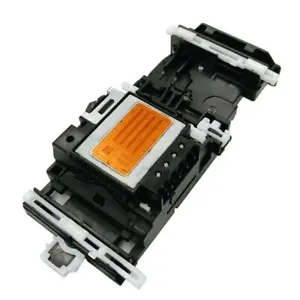
Genuine Brother Printer Head for MFC-J125, J265W, J315W, J515W, J415W, J615W, J140W Series Printers


₹17,382.00
– Crisp, vibrant printouts for an array of print jobs.
– Perfect for students, home or office use.
– Compatible with Brother printers, performance guaranteed.
– Quality prints every time at an unbeatable value.
– Durable for long-lasting use.
100 in stock
Brother Printer Head for MFC-J125 J265W J315W J515W J415W J615W J140W Printers
Product Features:
- Direct replacement for the original Brother print head
- Ensures optimal print quality and performance
- Easy to install and replace
- Compatible with a wide range of Brother printers including MFC-J125, J265W, J315W, J515W, J415W, J615W, and J140W
Benefits:
- Replacement print head for Brother printers
- Ensures optimal performance
- Cost-effective solution
- Extend the life of your printer
Usage:
- This print head is used to replace a damaged or malfunctioning print head in compatible Brother printers.
- It is essential for maintaining the optimal performance of your printer and producing high-quality prints.
Specifications:
- Type: Print head
- Compatibility: Brother MFC-J125, J265W, J315W, J515W, J415W, J615W, J140W printers
- Color: Black
- Warranty: 1 year
Installation:
- Turn off the printer and unplug it from the power outlet.
- Open the printer cover and locate the print head.
- Gently lift out the old print head and replace it with the new one.
- Close the printer cover and plug it back into the power outlet.
- Turn on the printer and wait for it to initialize.
Troubleshooting:
- If you are having problems with your print head, try the following:
- Make sure that the print head is properly installed.
- Clean the print head with a soft cloth.
- Check the printer’s ink levels.
- If the problem persists, contact Brother customer support.
Related products

₹59,400.00

Uncategorized
Guerlain Spiritueuse Double Vanille: Hypnotic and Alluring EDP in 2.5oz/75ml Collector's Edition
₹708,000.00


₹191,880.00
Uncategorized
1+2+3 Stages Dental Orthodontic Teeth Corrector Braces for Straightening and Retaining Teeth
₹4,485.00

Uncategorized
Master Cybersecurity Threats with Microsoft Security Operations Analyst SC-200 Video Training
₹5,391.00

₹17,542.50