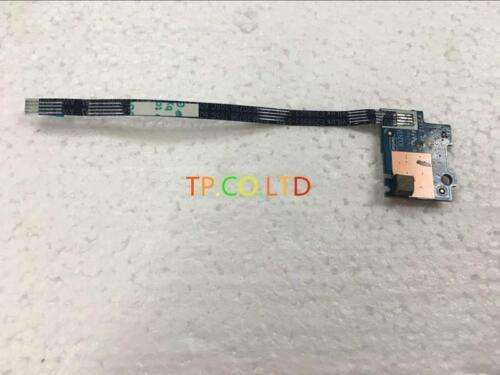
Dell 15 15R 3521 5521 3537 5537 Power Button Board Switch Assembly Cable
₹8,100.00
– Fits for Dell 15-3537 3521 15R-5537 15R-5521 – High-quality Power Button Board Switch comes with Cable – It is used to fix issues where Power Button is not working properly – Easy to replace – Durable and Long-Lasting
100 in stock
Dell 15-3537 3521 15R-5537 15R-5521 Power Button Board Switch + Cable LS-9101P
If your Dell laptop’s power button is not working, you may need to replace the power button board switch and cable. This Dell 15-3537 3521 15R-5537 15R-5521 Power Button Board Switch + Cable LS-9101P is a genuine Dell part that will restore your laptop’s power button functionality.
Product Features:
- Genuine Dell replacement part
- Restores your laptop’s power button functionality
- Easy to install
- Durable construction
- Dell 15-3537
- Dell 3521
- Dell 15R-5537
- Dell 15R-5521
- Power off your laptop and disconnect it from the power outlet.
- Remove the battery.
- Locate the power button board switch and cable.
- Disconnect the old power button board switch and cable.
- Connect the new power button board switch and cable.
- Reinstall the battery.
- Power on your laptop.
Compatibility:
Installation Instructions:
Dell Laptop Power Button Board Switch and Cable Installation Guide
Related products

Uncategorized
Master Cybersecurity Threats with Microsoft Security Operations Analyst SC-200 Video Training



Uncategorized
Guerlain Spiritueuse Double Vanille: Hypnotic and Alluring EDP in 2.5oz/75ml Collector's Edition